

Close the loop on email health.
DMARC management and more, giving you a complete picture of who is sending from your clients' domains, what to fix, and how to prove it's working.
From exposed to enforced, in three phases.
See who is using your clients' domains.
Add a single DNS record and Radar gets to work. Within days you have a full map of every service sending email from your clients' domains: the authorized tools, the shadow IT, the forwarders, and anything that looks suspicious. Most organizations are surprised by what shows up.
Get every sender authenticated.
With the full picture in front of you, Radar makes it straightforward to fix what's broken and configure what's missing. Manage SPF records, DKIM keys, DMARC policy, and BIMI from one tool. A shareable setup link lets you hand off DNS tasks to whoever owns the records, with self-verification built in so you know when it's done.
Reach p=reject. Show your work.
The real goal is full enforcement. Radar tracks compliance across every authorized sender, surfaces what's still failing, and helps you keep your clients on a clear path forward. Most organizations get to p=reject within 90 days. Radar gives you the reports to check every step.
Everything email authentication requires in one platform
Full visibility, zero guesswork
The Radar dashboard gives you a high-level view of each domain's authentication health at a glance. See DMARC policy status, email volume, sender compliance, and any issues that need attention. Switch between clients in a click without leaving the platform.

Know every sender by name
Radar identifies and categorizes every service sending from a client's domain: authorized senders, email forwarders, unapproved tools, and anything that looks like spoofing activity. You see the compliance rate for each one, and can drill into individual IP addresses to understand exactly what is happening and why.
DMARC, SPF, and DKIM in one place
Manage all four authentication layers from a single interface without switching between DNS providers and configuration files. DMARC policy updates happen with a click. SPF flattening keeps records valid as cloud services accumulate. DKIM key management imports known selectors automatically.
Numbers that make the case
Radar turns raw DMARC data into clean, filterable views. It can help you track compliance rates, email volume, deliverability, and sender reputation over time, across the many domains you manage. Pull the data you need to show customers their progress, justify the service, and open conversations about what email security issues to tackle next.
Inbound security included
Radar also supports MTA-STS and TLS-RPT to enforce encrypted transport for inbound mail and surface any delivery failures. It is a useful complement to DMARC that clients can add as part of the same project or down the road.
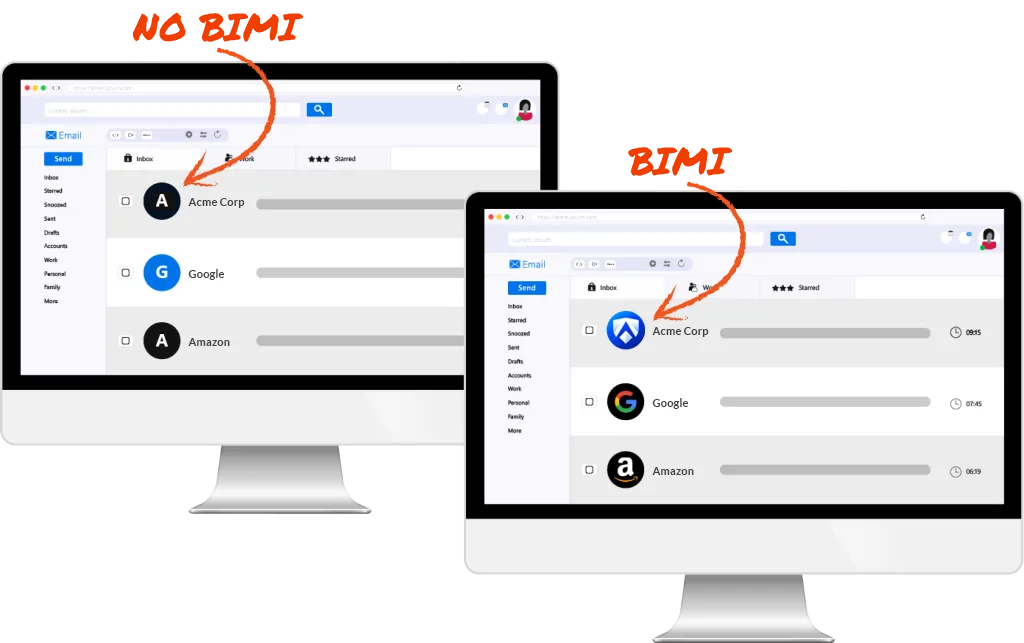
Put your clients' logo in the inbox
Once DMARC enforcement is in place, BIMI lets clients display their brand logo next to emails in Gmail, Apple Mail, and other supporting providers. Radar tracks which mail providers are recognizing the BIMI certificate, giving you a concrete story to tell about email brand value.
A key email security service your clients need, but a conversation most MSPs aren't having
Most of your clients already have some form of DMARC in place. They may have set it up themselves or relied on a past MSP to get it right. The problem is that the majority are stuck at p=none, which means the record exists but provides no actual protection long term.
Full enforcement is often a service gap, and a significant growth opportunity
Radar gives you a practical way to open the email health conversation
Lead with the problem, let the data do the talking
Run a quick domain analysis for any prospect and Radar immediately surfaces their authentication gaps. It's an easy, visual way to show potential clients exactly where they are vulnerable before you've even had the full security conversation.
A ready-made expansion conversation
DMARC is increasingly required by regulators and major email providers. Radar gives you a concrete, compliance-focused service to add to the conversation for contract renewals or to entice new prospects. It builds on what you already manage and raises the floor of what "protected" actually means.
Explain that the mandate is already here
Your clients may not know that since 2024, Google, Yahoo, and Microsoft have all tightened email authentication requirements. Regulatory frameworks including PCI DSS v4.0, GDPR, and NIST CSF all point toward DMARC as part of a baseline security posture. Your clients are feeling the pressure. Radar is how you help them respond to it.
Put your brand front and center
As clients progress through their DMARC journey, all reports they receive will come branded to your MSP. Every email health update reinforces that your team is the one driving their results. This gives you a natural touchpoint to show the value of what you manage.
The perfect response to ‘I already have an IT guy’
We've had great success using Radar during discovery conversations. When a prospect doesn't receive a perfect score, it naturally opens the door to a deeper discussion around security gaps, risk exposure, and best practices. Instead of us pitching what might go wrong, Radar gives them something concrete to look at. We've used this approach with our last five prospects, and three of them have moved forward as new managed clients.

Radar closes the authentication gap. Mailprotector's filtering covers the rest.
Radar is sold bundled with one of our two popular email filtering products.

Zero Trust Email Security
Shield provides advanced email security that protects your users without slowing down their productivity. Malicious, suspicious, and unwanted mail gets blocked with no complex allow/deny lists and no MX or DNS changes.
Learn more
Platform Agnostic Email Filtering
The MSP-first secure email gateway built with multi-tenant management in mind. CloudFilter's deep administrative control that doesn't take an email expert to run makes this the perfect tool for complex or custom email environments.
Learn moreFrequently Asked Questions
What is DMARC and why does it matter now?
DMARC stands for Domain-based Message Authentication, Reporting, and Conformance. It is an email authentication standard that tells receiving mail servers what to do with emails that fail SPF or DKIM checks. Without it, anyone can send an email that appears to come from your domain. Since 2024, Google, Yahoo, and Microsoft have all introduced stricter authentication requirements, and regulators are following. The question for most businesses is no longer whether to implement DMARC, but how quickly they can get to full enforcement.
How is Radar different from other DMARC tools?
Beyond being bundled with Mailprotector tools you already love, some other DMARC tools simply check whether records are present and correctly formatted. Radar goes several steps further: it processes live DMARC data from actual email flows, identifies every service sending from a domain, categorizes senders, and gives you the controls to fix authentication issues and advance policy. It is an ongoing management platform, not a one-time check.
What does getting to p=reject actually involve?
It starts with visibility: understanding every service that sends email from the domain. Then each sender needs to be properly authenticated through SPF alignment, DKIM signing, or both. Once the legitimate senders are covered, you can move the DMARC policy from none to quarantine and eventually to reject. Radar walks you through that progression and tracks compliance at each step. Most clients get there within 90 days.
What does Radar manage beyond DMARC?
Radar handles SPF including automatic SPF flattening to stay under the 10-lookup limit, DKIM key management, DMARC policy, MTA-STS for enforcing encrypted inbound transport, TLS-RPT for transport layer reporting, and BIMI for inbox brand display. Everything a domain needs to be fully authenticated and enforced is in one SKU.
What is SPF flattening?
SPF records have a limit of 10 DNS lookups. Add a handful of cloud services and it is easy to exceed that limit, which causes SPF to silently fail. Radar’s SPF flattening compresses the record into raw IP addresses automatically, keeping the client under the limit regardless of how many services they use.
What happens to my clients' email data?
Radar processes DMARC aggregate reports, which contain metadata about email flows and not the content of individual messages. Message content is never exposed. Forensic failure reports, which can contain more detail, are turned off by default and must be explicitly enabled per domain.
How does Radar fit with the rest of the Mailprotector platform?
Radar is part of the Mailprotector email security suite, so it lives in the same Console your team already uses (or will soon) for email security. DMARC management sits alongside inbound filtering, encryption, and archiving as part of a complete email security offering. No separate vendor, no separate login, no multiple invoices to keep track of, and, most importantly, no gap in coverage.
Ready to add DMARC, DKIM, SPF, and BIMI to your security stack?
Talk to us about getting your clients from exposed to enforced, and see how Radar fits alongside the tools you already use.